Homeowners: 5 Least Invasive Fixes for a Missing C Wire
Your thermostat needs a C wire if it’s a Wi-Fi model with a touchscreen, and the fix is usually a lot simpler than it sounds. The C wire delivers continuous 24VAC power that keeps the display lit and the Wi-Fi radio talking to your router. If yours is rebooting, dropping offline, or dead on arrival, check the wall plate for a spare wire, grab a power adapter, or call a licensed technician to sort it out.
TL;DR:
- Most Wi-Fi thermostats require a C wire providing a steady 24VAC power, which is essential for the display, Wi-Fi, and firmware updates.
- Confirming the presence of a C wire involves turning off power, inspecting the terminal block for a labeled “C” or “COM,” and verifying voltage with a multimeter.
- If no C wire exists, options include reusing an unused wire, installing a manufacturer adapter, adding a wire splitter, running new cable, or hiring a professional technician.
- Proper installation requires turning off power, documenting wiring, following installation instructions carefully, and testing system stability after setup.
- Incorrect wiring, especially in systems with separate transformers, can cause system damage or short circuits, making professional diagnosis and installation safer.
Table of Contents
- What Is a C Wire for a Thermostat, and How Do You Find It?
- Why Does a Smart Thermostat Need Constant Power?
- What Are Your Options If You Don’t Have a C Wire?
- How Do You Connect a Spare Wire or Install a C-Wire Adapter?
- What If the Thermostat Still Has Problems After You Add a C Wire?
- Can a Bad C Wire Install Damage Your HVAC System?
- What Do Common HVAC Wiring Diagrams Look Like With a C Wire?
- How Much Does It Cost to Add a C Wire Professionally?
- What Do HVAC Technicians Wish Homeowners Knew About C Wires?
- How Tru Comfort Handles Missing C-Wire Calls
- Sources
What Is a C Wire for a Thermostat, and How Do You Find It?
The common wire, or C wire, is one of the conductors running between your thermostat and the control board inside your furnace or air handler. It carries steady 24 volts AC, which is what most smart thermostats need to keep their screens and radios powered around the clock, according to Honeywell Home.
Finding out if you already have one is a five-minute job. Start here:
- Turn off power to the thermostat, either at the thermostat itself or at the breaker.
- Pop off the faceplate and look at the terminal block behind it.
- Check for a terminal labeled “C” or “COM,” not just an unused wire.
- Trace the same wire bundle to the control board inside the air handler or furnace and confirm it lands on a matching C terminal there.
Don’t trust wire color to tell you anything. Blue is the common convention, but installers have used yellow, black, or whatever spool was on the truck that day, so the label at the terminal is the only thing that counts, not the insulation shade.
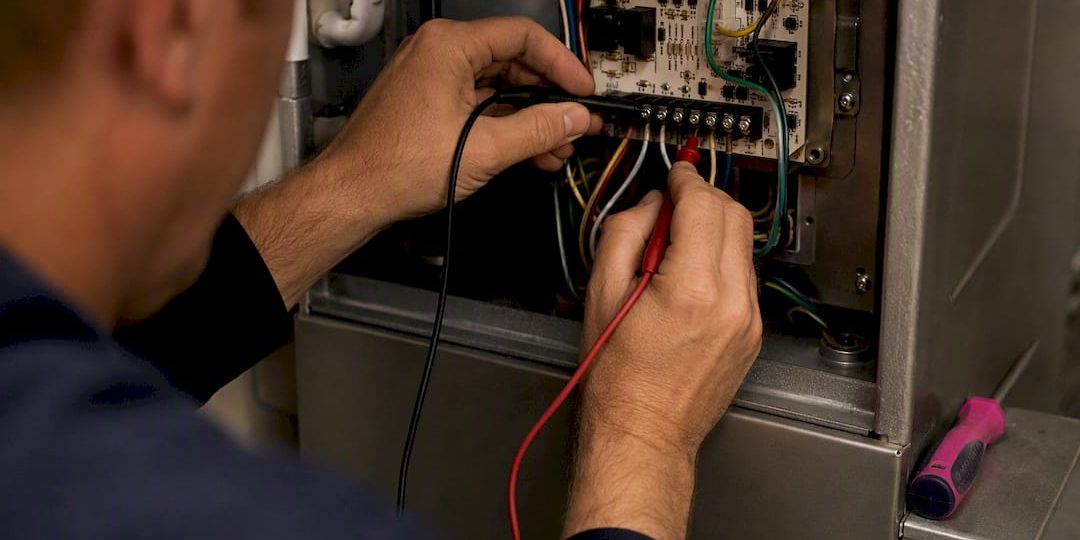
If you want to confirm voltage rather than just guess, a multimeter reading across R and C at the control board should show close to 24VAC. Shut off power before touching any terminals, and only restore it once your meter leads are clear.
Pro Tip: Keep your multimeter set to AC voltage, not DC, before you test anything at the control board. This is also the exact skill covered in testing an HVAC blower motor, so it’s worth practicing on a system you already understand.
Why Does a Smart Thermostat Need Constant Power?
Think of the R wire as the hot side of a tiny 24-volt circuit and the C wire as its return path. Together they give the thermostat an always-on power loop, separate from the switching signals that turn on your heat or air conditioning. Older mechanical thermostats never needed this because they just flipped a switch. Smart thermostats need that steady loop to run a screen, hold a Wi-Fi connection, and quietly check for firmware updates in the background.
Most Wi-Fi thermostats with color touchscreens fall into this category, and manufacturers including Sensi publish compatibility tools specifically because the answer depends on your exact HVAC setup , not just the thermostat model.
Some thermostats try to work around a missing C wire by “power-stealing,” pulling tiny amounts of current from the signal wires themselves. It can work for a while. It can also cause flickering displays, dropped connections, or worse, unstable operation and relay wear on the equipment’s control board over time. Before assuming power-stealing will solve anything, check your specific thermostat’s installation requirements first.
What Are Your Options If You Don’t Have a C Wire?
No C wire showing up at the wall plate doesn’t mean you’re stuck. Homeowners generally have five paths forward, and which one makes sense depends on what’s already running through your walls.
- Reuse an unused conductor. If your thermostat cable has five or more wires and one isn’t doing anything (a spare wire for a feature you don’t use, like a second-stage heat lead), you can often repurpose it as your C wire. This is the cheapest and fastest fix, but it only works if that spare wire actually reaches both ends.
- Install a C-wire adapter or power connector. When there’s no spare conductor, a manufacturer adapter like a Nest Power Connector uses your existing wires more efficiently to create a C connection, according to Google Nest support.
- Add an Add-a-Wire module. These small devices split one wire’s signal to serve two functions, effectively freeing up a conductor for C-wire duty. They work, but they add another box and another point of failure inside your system.
- Run new low-voltage cable. This is the most reliable long-term fix, especially in a remodel where walls are already open, but it’s the most invasive option for a finished space.
- Hire a licensed technician. Heat pumps, zoned systems, and dual-transformer setups (separate transformers for heating and cooling) turn a simple wiring question into a real electrical decision, and this is where a professional earns their fee.
Documented technical guides consistently list these same four or five approaches as the standard menu of fixes, according to InspectApedia, which tells you this isn’t a niche problem. It’s one HVAC pros solve constantly.
Pro Tip: Before buying any adapter, check inside the thermostat’s box. Some models, including certain ecobee units, ship with a power extender kit already included, and that’s the cheapest fix of all: free.
How Do You Connect a Spare Wire or Install a C-Wire Adapter?
Once you know which fix fits your system, the actual work follows a short, repeatable sequence. Rushing any one of these steps is how a simple job turns into a service call.
- Shut off power at the breaker, not just at the thermostat, and confirm it’s off with a multimeter or a non-contact voltage tester.
- Photograph the existing wiring before you touch anything, and label each wire with tape if the terminal markings are worn or faded.
- If you’re using a spare wire, connect one end to the C terminal at the furnace or air handler control board, then connect the other end to the C terminal on the thermostat base.
- If you’re installing a manufacturer adapter, follow the kit’s wiring diagram exactly. These devices typically ask you to move one or two wires into the adapter module rather than directly onto the thermostat, and skipping a step here is the most common install mistake.
- Restore power at the breaker, then power up the thermostat and watch it through a full cycle, checking for a stable Wi-Fi connection and no unexpected reboots.
Careful documentation before disconnecting wires and verifying every connection at both ends is standard guidance from Honeywell’s own adapter installation instructions, and it’s the single habit that prevents most callback visits.
What If the Thermostat Still Has Problems After You Add a C Wire?
A properly wired C wire fixes most stability issues, but not every symptom clears up on its own. Watch for these signals:
- Battery drain that continues even after wiring changes, which usually points to a bad connection rather than a missing wire.
- Frequent reboots or a screen that flickers when the system cycles on.
- Wi-Fi that drops specifically when the heat or air conditioning kicks on, a classic sign of a shared or overloaded circuit.
- A furnace that short-cycles, turning on and off in rapid bursts.
Confirm the fix worked by rechecking voltage and continuity at the C terminal with your multimeter. If you see relay chatter or short-cycling that wasn’t there before, stop immediately, disconnect your changes, restore the original wiring, and call a technician. Continuing to run equipment under those symptoms risks damaging the HVAC control relay, and that’s a repair bill nobody wants.
Can a Bad C Wire Install Damage Your HVAC System?
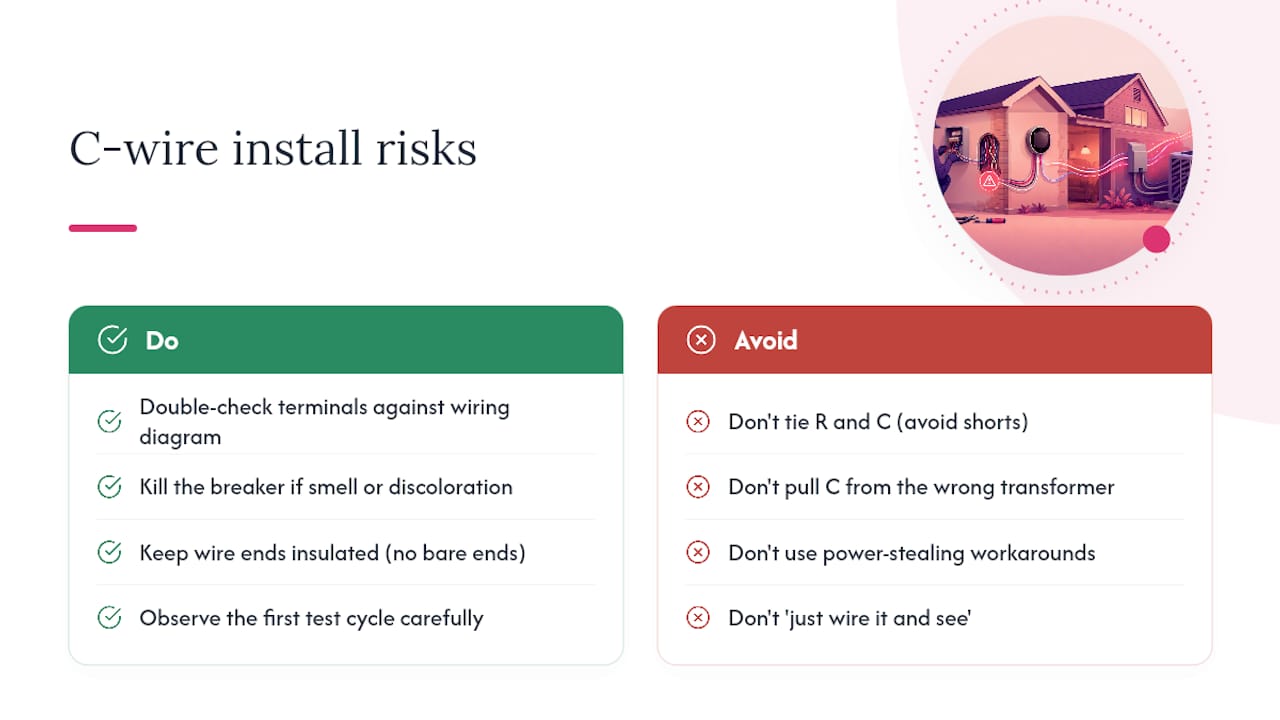
A miswired C wire connection is rarely catastrophic, but it’s not risk-free either. The most common issue is a short between the R and C terminals, which can trip a transformer’s internal fuse or, in older systems without that protection, burn out the transformer entirely. That’s usually a $150 to $300 part on top of the labor to diagnose it.
Systems with separate transformers for heating and cooling raise the stakes further. If you pull C from the wrong transformer, you can create a short between two independent 24-volt circuits that were never meant to touch, according to a technical discussion on separate-transformer wiring. This is exactly the kind of setup where “just wire it and see” turns expensive fast.
Power-stealing workarounds carry their own slower risk. Instead of an immediate short, you get gradual relay wear from the equipment cycling more than it should to keep the thermostat charged, and that shortens the life of parts that are far pricier to replace than a spare wire.
The safest habit is simple: never leave bare wire ends exposed near the control board, double check every terminal against the wiring diagram before restoring power, and if anything smells hot or looks discolored after your first test cycle, kill the breaker and step back.
What Do Common HVAC Wiring Diagrams Look Like With a C Wire?
Standard residential systems tend to fall into a few wiring patterns, and knowing which one you’re looking at makes the rest of the job much easier.
Conventional gas furnace with AC, one transformer: R, C, W (heat), Y (cooling compressor), and G (fan) all land on a single terminal block inside the furnace. The C terminal here is straightforward, since there’s only one 24VAC source feeding the whole board.
Heat pump systems add complexity with O/B terminals for reversing valve control, plus sometimes an auxiliary heat strip circuit. The C wire still comes from the same transformer, but there are more terminals competing for space, and mislabeling is common.
Systems with separate heating and cooling transformers, often found in older homes with add-on air conditioning, require you to source C from the transformer that’s actually powering the circuit the thermostat monitors, not just whichever transformer is closer.
Zoned systems route thermostat wiring through a zone control panel rather than straight to the furnace board, which means your C wire connection point may be a full step removed from the equipment itself.
If your setup matches the first pattern, a spare-wire fix or basic adapter is usually enough. Anything with two transformers or a zone panel is where professional HVAC service starts making more sense than a solo attempt, particularly if you’re already unsure which board is which.
How Much Does It Cost to Add a C Wire Professionally?
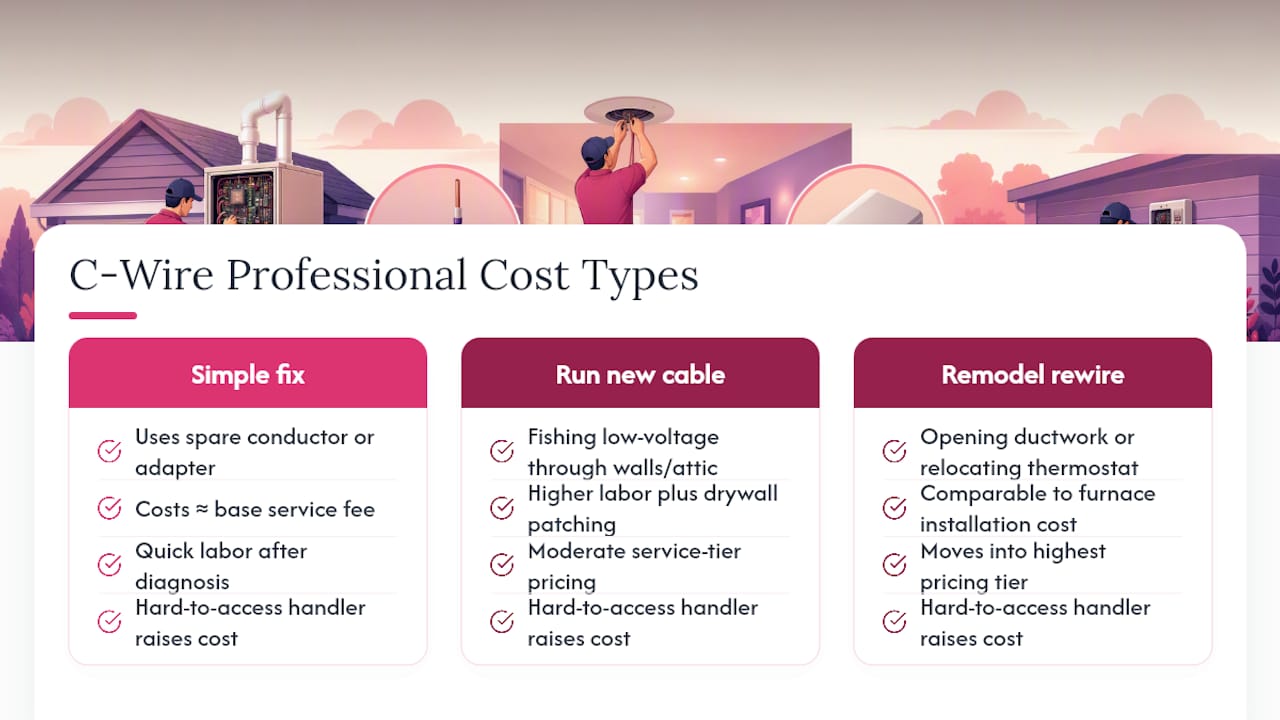
Hiring a technician to add a C wire is one of the less expensive HVAC service calls you can book, mostly because the labor is quick once the tech has diagnosed your system. A straightforward job, reusing a spare conductor or installing a manufacturer adapter, typically runs on the lower end of a standard diagnostic and minor-repair visit, often comparable to the base service fee most HVAC companies charge just to show up.
Costs climb when the job requires running new low-voltage cable through walls or attic space, since that adds real labor hours and sometimes drywall patching. A remodel-level rewire, especially one that also involves opening up ductwork or relocating the thermostat itself, moves into a different pricing tier entirely, closer to what you’d expect from a furnace installation project than a simple wiring fix.
Two things push the price up regardless of the base job: a hard-to-access air handler (attic, tight closet, crawlspace) and a dual-transformer system that needs careful tracing before anyone touches a wire. Ask for a diagnostic quote upfront, and be specific about whether your thermostat is already installed or if you’re doing a full swap, since that changes the scope significantly.
What Do HVAC Technicians Wish Homeowners Knew About C Wires?
The terminal label is the only thing that matters, and technicians see homeowners trust wire color constantly, then get confused when it lies to them. Confirm C at the control board with a multimeter before you touch the thermostat end. Separate transformers for heat and cool trip up more DIYers than any other wiring quirk, because pulling C from the wrong one can short two circuits that were never designed to meet.
If you restore power and hear relays clicking that weren’t clicking before, or the system starts short-cycling, stop. That’s not a wiring inconvenience. That’s a sign to call a professional before the equipment pays the price for a wiring guess.
How Tru Comfort Handles Missing C-Wire Calls
Diagnosing a missing C wire is fast work for a technician who does it every week, and that’s exactly the kind of visit Trucomfortaz handles without upselling you into a bigger job than you need. Technicians confirm voltage at the control board, identify the least invasive fix for your specific system, and test the thermostat through a full cycle before they leave.

A typical visit covers three things: inspection of your existing wiring, installation of whichever fix actually fits (spare wire, adapter, or new cable if the walls are already open), and a post-install test to confirm the thermostat holds its connection under real operating conditions. If your system turns out to have separate transformers or zoned wiring, you’ll know before any wire gets cut, not after. If you’re mid-decision on a bigger upgrade, our page on furnace installation walks through what that process and timeline actually look like. Ready to get it diagnosed properly? Schedule a visit with Tru Comfort and get your thermostat running the way it’s supposed to.
Sources
- What is a C-Wire? How It Works on Your Thermostat | Honeywell Home
- Learn about the common or C wire – Google Home and Nest Help
- What is a C wire or common wire? | Sensi
- Thermostat C-Wire how to add a common wire | InspectApedia