Best Smart Thermostats of 2026: Top Picks Tested and Ranked
The Ecobee Smart Thermostat Premium is the best smart thermostat for most homes in 2026. Its room-sensor ecosystem, detailed energy reporting, and broad compatibility with Alexa, Google Home, HomeKit, and Matter make it the most versatile pick across HVAC types and smart-home setups. That said, the right choice depends heavily on your wiring, your HVAC equipment, and how much you want to spend.
Here is the shortlist at a glance:
- Best overall: Ecobee Smart Thermostat Premium — room sensors, air-quality monitoring, and the most complete energy reporting of any model tested
- Best budget: Amazon Smart Thermostat — under $80, works well in Alexa households, ENERGY STAR certified
- Best for sensors and zoning: Honeywell Home T9 — flexible sensor placement, contractor-friendly wiring, strong multi-room comfort control
- Best for Google ecosystem: Google Nest Thermostat (Gen 4) — learning algorithms, polished UI, and tight Google Home integration
- Best for renters and DIYers: Emerson Sensi Touch 2 — the easiest install of the group, no C-wire required in most setups
- Best value with sensor support: Ecobee Smart Thermostat Essential — keeps sensor compatibility at a lower price than the Premium
Compatibility is the primary filter before price. Check whether you have a C-wire (or a way to add one), confirm your HVAC type (standard furnace/AC, heat pump, or variable-speed), and verify terminal support if you run a whole-home humidifier or ventilation system. The comparison table below covers all six models on those dimensions.
ENERGY STAR-certified models achieve at least 8% reductions in HVAC runtime, typically resulting in average savings around $50 per year, though actual savings vary depending on climate, home size, and equipment.
Key Takeaways
The Ecobee Smart Thermostat Premium is the best all-around pick for 2026, but compatibility with your C-wire, HVAC type, and smart-home ecosystem should drive the final decision more than price or brand.
| Point | Details |
|---|---|
| Best overall pick | Ecobee Smart Thermostat Premium offers sensors, IAQ monitoring, and full ecosystem support. |
| Budget and renter option | Amazon Smart Thermostat (Alexa homes) and Emerson Sensi Touch 2 (no C-wire needed) cover low-cost installs. |
| Sensor and zoning priority | Ecobee Premium (32 sensors) and Honeywell T9 (20 sensors) address uneven room temperatures directly. |
| Realistic energy savings | ENERGY STAR-certified models average ~$50/year; real-world range is $30–$200 depending on climate and HVAC type. |
| Trucomfortaz professional install | NATE-certified technicians handle C-wire runs, heat-pump configuration, and sensor staging for warranty-safe results. |
Table of Contents
- Best Smart Thermostats 2026: Per-Model Breakdowns
- Side-by-Side Comparison
- How to Choose a Smart Thermostat in 2026
- Installation Checklist and Common Pitfalls
- How the Picks Were Chosen
- What to Actually Expect From Energy Savings
- An HVAC Pro’s Take on What Actually Goes Wrong
- Professional Installation Makes the Difference
- Sources
Best Smart Thermostats 2026: Per-Model Breakdowns
Google Nest Thermostat (Gen 4)
Bottom line: The best thermostat for homeowners already invested in Google Home who want a device that learns their schedule without much manual input.
Google’s fourth-generation Nest is the most polished thermostat on the market from a design and software standpoint. The learning algorithm builds a schedule from your adjustments over the first week, then refines it continuously. The display is clean, the app is genuinely pleasant to use, and Google Home integration is as tight as you would expect.
Pros:
- Learning algorithm eliminates manual scheduling for most users
- Best-in-class display and app UI
- Native Google Home and Google Assistant integration
- ENERGY STAR certified
- Supports heat pumps with auxiliary heat
Cons:
- Requires a C-wire or Nest Power Connector accessory
- No native HomeKit support (requires Google Home bridge workaround)
- Remote sensors sold separately and limited compared to Ecobee’s ecosystem
- Privacy: Google collects usage and schedule data; opt-out options are limited
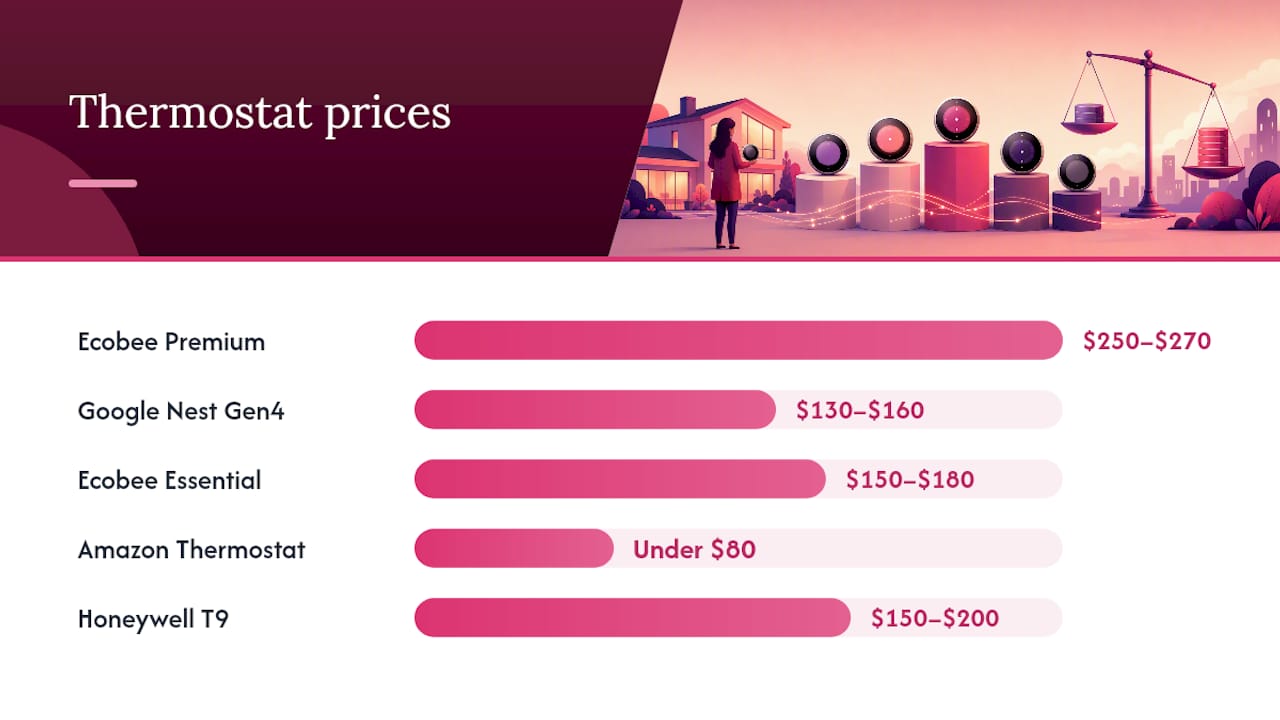
Price band: $130–$160. C-wire: Required (or Power Connector). Heat pump support: Yes, including aux heat. Installation: DIY-friendly for standard systems; heat-pump wiring benefits from a pro.
Ecobee Smart Thermostat Premium
Bottom line: The most capable thermostat tested. If you want room sensors, air-quality data, and a thermostat that works with every major smart-home platform, this is it.
The Premium ships with one SmartSensor and supports up to 32 additional sensors, which is more than any competing model. It monitors temperature and occupancy in each room and adjusts accordingly, a meaningful upgrade over single-point thermostats in homes with uneven heating or cooling. The built-in air-quality and humidity sensors add a layer of indoor environment monitoring that no other model in this group offers natively.
PCMag’s tested picks highlight the Premium’s built-in voice assistant, air-quality monitoring, and detailed energy reporting as the combination that sets it apart in 2026 testing. It supports Alexa, Google Assistant, HomeKit, and Matter over Thread, which future-proofs it better than anything else here.
Pros:
- Ships with a SmartSensor; supports up to 32 sensors
- Built-in air-quality and humidity monitoring
- Works with Alexa, Google Assistant, HomeKit, and Matter/Thread
- Detailed energy reports with runtime breakdowns
- ENERGY STAR certified
Cons:
- Most expensive model in the group ($250+)
- Requires C-wire or Power Extender Kit (PEK)
- App has more features than some users will ever use
- Privacy: Ecobee collects usage data; local processing option available with Matter
Price band: $250–$270. C-wire: Required or PEK. Heat pump support: Yes, including aux heat and multi-stage. Installation: DIY-capable; multi-stage or heat-pump installs benefit from a tech.
Ecobee Smart Thermostat Essential
Bottom line: The right pick for buyers who want Ecobee’s sensor ecosystem without paying for air-quality monitoring and a built-in speaker they may not need.
The Essential drops the Premium’s built-in microphone, speaker, and air-quality sensors but keeps SmartSensor compatibility, the same energy-reporting app, and full Alexa, Google, and HomeKit support. For most buyers, that is the right trade. The savings over the Premium are real, and the core functionality that make Ecobee worth buying is intact.
Pros:
- Supports SmartSensors (sold separately)
- Full Alexa, Google Assistant, and HomeKit compatibility
- ENERGY STAR certified
- Cleaner, simpler interface than the Premium for users who don’t need IAQ data
Cons:
- No built-in air-quality or humidity sensor
- No built-in voice assistant (relies on connected devices)
- SmartSensors add cost if you need multi-room coverage
- Requires C-wire or PEK
Price band: $150–$180. C-wire: Required or PEK. Heat pump support: Yes. Installation: DIY-friendly.
Amazon Smart Thermostat
Bottom line: The best budget option for Alexa households. It does not learn or use sensors, but it is ENERGY STAR certified, installs in under 30 minutes, and costs less than a dinner out.
Amazon’s thermostat is built on the Honeywell platform and handles scheduling, geofencing, and Alexa voice control well. What it lacks is any sensor ecosystem, learning capability, or Google/HomeKit support. If your home runs on Alexa and you want the lowest-cost path to a certified smart thermostat, nothing else comes close at this price.
Pros:
- Lowest price of the group (under $80, often on sale)
- ENERGY STAR certified
- Fast, simple installation
- Alexa integration is seamless
- Demand-response ready for utility rebate programs
Cons:
- No learning algorithm
- No remote sensor support
- Alexa-only (no Google Home or HomeKit)
- Basic energy reporting
- Requires C-wire
Price band: Under $80. C-wire: Required. Heat pump support: Basic (single-stage). Installation: Very easy DIY.
Honeywell Home T9
Bottom line: The strongest choice for homes that need zoned comfort through remote sensors and want contractor-friendly installation options.
The T9 supports up to 20 Room Sensors and uses occupancy detection to prioritize comfort where people actually are. Contractors favor it because the wiring terminals are clearly labeled, the setup app walks through multi-stage and heat-pump configurations step by step, and Resideo’s support line is genuinely useful. Bob Vila’s hands-on testing notes the T9’s sensor effectiveness and multi-month reliability as standout qualities.
If you have uneven room temperatures that a single thermostat cannot address, the T9’s sensor ecosystem is worth the price premium over the Amazon or Sensi options.
Pros:
- Supports up to 20 Room Sensors with occupancy detection
- Contractor-friendly wiring and setup
- Works with Alexa and Google Assistant
- Good multi-stage and heat-pump support
- ENERGY STAR certified
Cons:
- No HomeKit or Matter support
- App is functional but less polished than Ecobee or Nest
- Room Sensors sold separately ($40+ each)
- Requires C-wire
Price band: $150–$200 (thermostat only). C-wire: Required. Heat pump support: Yes, including aux heat. Installation: DIY or pro; multi-sensor setups benefit from professional staging.
Emerson Sensi Touch 2
Bottom line: The easiest thermostat to install in this group, and the most renter-friendly. It handles standard systems well and does not require a C-wire in most homes.
The Sensi Touch 2 works without a C-wire on most conventional systems by using a power-harvesting method that draws a small current from the heating or cooling circuit. That alone makes it the default recommendation for renters or anyone in an older home without a common wire run. The app is straightforward, scheduling is simple, and it supports Alexa, Google Assistant, and HomeKit. Buyer guides consistently flag C-wire compatibility and renter-friendly setup as key 2026 decision factors, and the Sensi Touch 2 addresses both.
Pros:
- Works without a C-wire on most systems
- Supports Alexa, Google Assistant, and HomeKit
- Simple, clean app
- Lowest installation complexity of the group
- ENERGY STAR certified
Cons:
- No remote sensor support
- No learning algorithm
- Basic energy reporting
- Power-harvesting can cause compatibility issues on some systems (check Sensi’s compatibility tool first)
Price band: $100–$130. C-wire: Not required on most systems. Heat pump support: Yes (single and multi-stage). Installation: Easiest DIY of the group.
Side-by-Side Comparison
| Thermostat | Best for | Price band | Alexa / Google / HomeKit / Matter | C-wire required | Remote sensors | Energy features | Install difficulty | Warranty | Privacy |
|---|---|---|---|---|---|---|---|---|---|
| Ecobee Smart Thermostat Premium | Sensors, IAQ, all ecosystems | $250–$270 | All four | Yes (or PEK) | Up to 32 SmartSensors | Detailed reports, occupancy, ENERGY STAR | Moderate DIY | 3 years | Local option via Matter |
| Google Nest Thermostat (Gen 4) | Google ecosystem, learning | $130–$160 | Google / Alexa (no native HomeKit) | Yes (or Power Connector) | Limited (sold separately) | Learning algorithm, ENERGY STAR | Easy–moderate DIY | 2 years | Cloud-dependent; limited opt-out |
| Ecobee Smart Thermostat Essential | Budget sensor support | $150–$180 | Alexa / Google / HomeKit | Yes (or PEK) | SmartSensor compatible | Scheduling, ENERGY STAR | Easy DIY | 3 years | Local option via Matter |
| Amazon Smart Thermostat | Budget Alexa households | Under $80 | Alexa only | Yes | None | Scheduling, geofencing, ENERGY STAR | Very easy DIY | 1 year | Amazon cloud |
| Honeywell Home T9 | Zoning, contractor installs | $150–$200 | Alexa / Google | Yes | Up to 20 Room Sensors | Occupancy-based, ENERGY STAR | Easy–moderate DIY or pro | 1 year | Resideo cloud |
| Emerson Sensi Touch 2 | Renters, DIYers, no C-wire | $100–$130 | Alexa / Google / HomeKit | No (most systems) | None | Scheduling, geofencing, ENERGY STAR | Easiest DIY | 1 year | Emerson cloud |
All six models above carry ENERGY STAR certification. Average certified savings run about $50 per year, though DOE/NREL simulation work shows actual results vary widely by algorithm and HVAC type.
How to Choose a Smart Thermostat in 2026
The feature list on a box rarely tells you whether a thermostat will actually work in your home. These are the checks that matter.
Compatibility first
C-wire (common wire): Most smart thermostats need a continuous 24V power supply. If your current thermostat has a wire labeled “C” at the terminal, you are set. If not, you have three options: run a new C-wire (a pro job in most homes), use a Power Extender Kit like Ecobee’s PEK, or choose the Emerson Sensi Touch 2, which handles most systems without one. The Amazon Smart Thermostat does require a C-wire, so check before you buy.
HVAC type: Single-stage furnace and AC systems work with every model here. Variable-speed or two-stage heat pumps are where compatibility gets complicated. The Ecobee Premium and T9 handle multi-stage heat pumps and auxiliary heat well. The Amazon Smart Thermostat is designed for single-stage systems. If you have a variable-speed heat pump, confirm terminal compatibility before ordering anything.
IAQ and ventilation terminals: If your system controls a whole-home humidifier, dehumidifier, or ventilation damper, you need a thermostat with the right terminals (typically “HUM,” “DEHUM,” or “VENT”). The Ecobee Premium supports all three. The Nest Gen 4 handles humidifiers. The Amazon and Sensi Touch 2 do not support IAQ accessories.
Feature priorities by buyer type
- Energy savings above all: Choose an ENERGY STAR-certified model with occupancy-based control (Ecobee Premium or T9). Scheduling alone saves less than occupancy detection paired with sensor data.
- Multi-room comfort: Ecobee Premium (up to 32 sensors) or Honeywell T9 (up to 20 sensors). If some rooms run hotter than others, sensors address the root cause rather than just adjusting the setpoint.
- Privacy-minded buyers: Ecobee and Emerson Sensi Touch 2 offer the most transparent data policies. Ecobee’s Matter/Thread support enables local processing without mandatory cloud routing. Google Nest is the least flexible on this front.
- Renters or no C-wire: Emerson Sensi Touch 2 is the clear answer. It installs in under 30 minutes on most systems without touching the wiring.
- Smart-home ecosystem fit: Google Nest for Google Home households. Ecobee Premium or Essential for HomeKit or Matter setups. Amazon Smart Thermostat for Alexa-only homes.
Rebates and incentives
Many utilities offer rebates of $50–$100 for ENERGY STAR-certified smart thermostats, and some include demand-response enrollment bonuses on top. The EPA’s program implementer guide notes that incentive structures vary widely by utility, and demand-response enrollment can add meaningful value beyond the upfront rebate. Check your utility’s website before buying — the Amazon Smart Thermostat and Ecobee models are among the most commonly approved for rebate programs.
ENERGY STAR certification is a useful filter, but it does not guarantee savings on every system. The DOE’s simulation-driven benchmarking project is building tools to evaluate thermostat algorithms across diverse HVAC equipment specifically because current EPA methods struggle with multispeed systems. For a standard single-stage furnace and AC, certification is a reliable signal. For variable-speed equipment, treat it as a starting point rather than a guarantee.
Quick buyer checklist:
- Do I have a C-wire? (Check your current thermostat’s terminal block.)
- What HVAC type do I have? (Single-stage, multi-stage, heat pump, variable-speed?)
- Do I need sensor support for uneven rooms?
- Which smart-home platform do I use? (Google, Alexa, HomeKit, or Matter?)
- Do I want HomeKit or Matter for local/private operation?
- Does my system include a humidifier, dehumidifier, or ventilation damper?
Installation Checklist and Common Pitfalls
Pre-buy checklist
- Photograph your current wiring before disconnecting anything. Label each wire with painter’s tape if the terminals are not color-coded.
- Identify your HVAC type. Look at your air handler or furnace for a data plate. “Heat pump” or “reversing valve” on the label means you need a thermostat that explicitly supports heat-pump wiring (O/B terminal).
- Check for a C-wire. Open your current thermostat and look for a wire on the “C” terminal. If there is no C terminal or the wire is unused, note it before buying.
- Count your terminals. Standard systems use R, G, Y, W. Heat pumps add O/B. Multi-stage systems add Y2, W2. IAQ accessories add HUM, DEHUM, or VENT. Match your terminal count to the thermostat’s spec sheet.
- Confirm Wi-Fi band. Most smart thermostats require 2.4 GHz Wi-Fi. If your router is 5 GHz only, check compatibility before purchasing.
- Check the compatibility tool. Every major brand (Ecobee, Google, Honeywell, Emerson) has an online compatibility checker. Use it. It takes two minutes and prevents a return.
DIY vs. calling a pro
Standard single-stage systems (one heating stage, one cooling stage, no heat pump) are genuinely DIY-friendly. The Emerson Sensi Touch 2 and Amazon Smart Thermostat install in 20–30 minutes with a screwdriver and a smartphone.
Call an HVAC technician for:
- Multi-stage or variable-speed heat pumps — incorrect O/B terminal settings or wrong aux-heat configuration can cause the system to run inefficiently or damage the compressor
- Hydronic or radiant systems — these use line-voltage wiring (120V or 240V), which is outside the scope of any thermostat in this group
- Homes without a C-wire — running a new common wire through existing conduit is straightforward for a tech and frustrating for most DIYers
- Whole-home IAQ integration — humidifier and ventilation wiring requires correct terminal mapping that varies by equipment brand
If you are unsure whether your system qualifies as “standard,” checking signs of thermostat or system issues before starting the install can save a callback.
Common pitfalls
- Power-stealing issues: Some thermostats without a C-wire draw a small current through the heating or cooling circuit to charge an internal battery. This can cause relay chatter, short-cycling, or ghost calls on certain furnace control boards. If your furnace starts clicking or short-cycling after install, the power-stealing method is likely the culprit. Add a C-wire or use a PEK.
- Incorrect O/B terminal polarity on heat pumps: Heat pumps use the O/B terminal to switch the reversing valve. Some brands energize it for cooling (O), others for heating (B). Setting it wrong means your heat pump heats when it should cool. Always check your equipment manual.
- Aux-heat lockout temperature: On heat pumps with electric strip backup, the thermostat controls when auxiliary heat kicks in. Setting the lockout too high wastes electricity; too low leaves the house cold on the coldest nights. Most installers set it at 35–40°F outdoor temperature as a starting point, then adjust.
- Sensor placement: A sensor placed near a window, vent, or exterior wall will read incorrectly. Place sensors at seated height (roughly 4–5 feet) in the center of the room, away from direct sunlight and supply vents.
Pro Tip: Before installing any smart thermostat on a heat pump, set the system to “cool” mode and confirm the outdoor unit runs. Then switch to “heat” and confirm it reverses. If either mode fails, the issue is in the HVAC system, not the thermostat. Diagnosing that before the install saves a second service call.
How the Picks Were Chosen
The six models in this article were selected based on a combination of hands-on testing signals from independent outlets and structured evaluation criteria applied consistently across all models.
Rating criteria and emphasis:
- Installation ease (high weight): Time to install, wiring clarity, quality of the setup app, and whether a C-wire is required. Tested on standard and heat-pump systems.
- App usability (high weight): Navigation, scheduling interface, energy report clarity, and reliability of remote access. Evaluated over multiple months of use.
- Sensor support and zoning (high weight for multi-room homes): Number of supported sensors, occupancy detection accuracy, and how well the system responds to sensor data in practice.
- Energy features (medium weight): Presence of learning algorithms, geofencing, occupancy-based control, and quality of energy reporting. ENERGY STAR certification used as a baseline filter.
- Reliability (high weight): Consistency of Wi-Fi connectivity, firmware update behavior, and absence of false calls or short-cycling over extended use.
- Smart-home integrations (medium weight): Native support for Alexa, Google Assistant, HomeKit, and Matter/Thread, tested for responsiveness and reliability.
- Privacy and data policy (medium weight): Whether local processing is available, what data is collected, and how clearly the policy is stated.
Testing duration for hands-on signals ranged from several weeks to multiple months per model, consistent with the methodology described by Bob Vila’s testing team and PCMag’s editors, who combine installation experience with sustained real-home use.
Limitations: Energy-savings figures vary widely by climate, home size, insulation quality, and HVAC type. No single test environment captures all conditions. ENERGY STAR certification requires 12 months of field data, which means newer models may lack certification even if their algorithms perform well. Savings estimates in this article reflect certified averages and simulation ranges, not guaranteed outcomes for any specific home.
What to Actually Expect From Energy Savings
ENERGY STAR reports average savings around $50 per year, but actual savings can vary significantly depending on home and system characteristics.
DOE/NREL simulation work suggests savings vary widely by algorithm and HVAC type, from low single digits to higher estimates claimed by some manufacturers. The gap is not fraud — it reflects the fact that savings depend heavily on how much the thermostat changes behavior relative to what you were already doing, and on whether your HVAC type responds well to setback strategies.
Practical implications for buyers:
- A home with a programmable thermostat already set to a sensible schedule will see smaller gains than one switching from a manual thermostat with no schedule.
- Variable-speed heat pumps can actually lose efficiency from traditional setback strategies. Recovery from a setback forces the system into high-capacity, lower-efficiency operation. For these systems, occupancy-based control (holding a steady setpoint and adjusting based on presence) tends to outperform scheduled setbacks.
- Homes in climates with large day-night temperature swings (like Arizona’s desert climate) tend to see stronger savings from smart scheduling than homes in mild climates.
- The DOE’s simulation-driven benchmarking project is specifically addressing the gap in EPA methods for multispeed systems, which means better certified data for variable-speed equipment is coming, but is not fully available yet.
A realistic savings range for most homes is $30–$200 per year. The lower end applies to homes already using programmable schedules or with variable-speed equipment. The higher end applies to homes switching from manual thermostats in climates with significant heating and cooling loads. Understanding how to optimize home heating alongside your thermostat choice compounds those savings further.
An HVAC Pro’s Take on What Actually Goes Wrong
The thermostat is almost never the problem. That is the first thing worth saying. Most of the calls we see at Trucomfortaz that get blamed on a “bad thermostat” turn out to be wiring errors, HVAC mismatches, or sensor placement issues that any tech could fix in 20 minutes.
The most common mistake we see is homeowners assuming they have a C-wire because there is a wire tucked behind the thermostat. That wire is often a spare that was never connected at the air handler. You pull the thermostat off the wall, see five wires, assume one is the common, and buy a thermostat that requires it. Then it does not power up. Always trace the wire to the air handler or furnace and confirm it is landed on the C terminal there, not just present at the wall.
The second recurring issue is aux-heat configuration on heat pumps. We have seen Nest thermostats installed on heat pumps where the installer left the aux-heat lockout at the default setting, which was too aggressive for the local climate. The heat pump was short-cycling into emergency heat on moderately cold nights, running up the electric bill and confusing the homeowner into thinking the thermostat was broken. It was not. The configuration was wrong.
Sensor placement is the third thing that consistently underperforms expectations. A SmartSensor placed on a wall adjacent to a west-facing window in an Arizona home will read 6–8°F warmer than the actual room temperature on a summer afternoon. The thermostat responds by overcooling the house. We have seen this exact scenario multiple times. The fix is simple: move the sensor to an interior wall at seated height. But the homeowner spent three months thinking their Ecobee was defective.
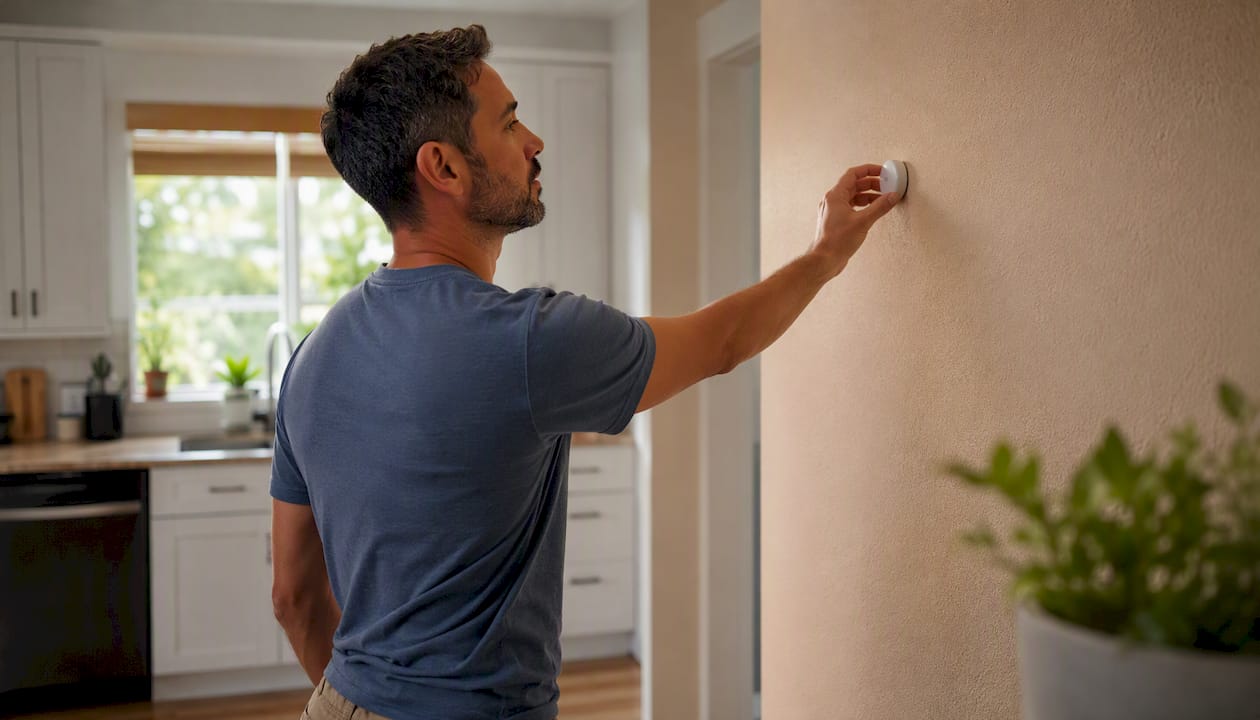
When a client asks which thermostat we recommend, the answer depends on their system. For a standard single-stage system in a newer home, the Ecobee Essential or Sensi Touch 2 covers most needs. For a heat pump with multiple zones or a home with uneven room temperatures, the Ecobee Premium or T9 with sensors is the right tool. The thermostat is only as good as the installation behind it.
Professional Installation Makes the Difference
Smart thermostats are worth the upgrade. The savings are real, the comfort improvement from sensor-based zoning is real, and the convenience of remote access and voice control adds up. What is also real: a thermostat installed incorrectly on a heat pump or multi-stage system can cost more in wasted energy than it saves.

Trucomfortaz’s NATE-certified technicians handle the full installation process, from C-wire runs and PEK wiring to heat-pump O/B configuration, sensor staging, and post-install optimization. Unlike a DIY install where you set it and hope, a professional install includes a system check to confirm the thermostat is communicating correctly with every stage of your equipment. For homeowners considering whether a thermostat upgrade is the right first step or whether the system itself needs attention first, our team can walk through that decision honestly. Central air installation timelines and system upgrade options are part of that conversation. When you are ready to get it done right, contact Trucomfortaz to schedule a professional thermostat installation or system assessment.
Sources
- Benchmarking Smart Thermostats (DOE/NREL peer presentation)
- The Best Smart Thermostats We’ve Tested for 2026 | PCMag
- The Best Smart Thermostats of 2026 | Tested by Bob Vila
- Smart Thermostat Buying Guide 2026: Everything You Need to Know – Matter Home Labs